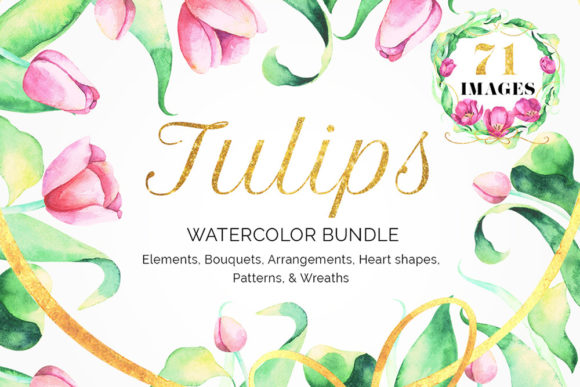
Tulips Watercolor Floral Bundle: A Versatile Design Resource
For creators needing elegant floral graphics, the Tulips Watercolor Floral Bundle and its complementary Pink Purple Tulip Watercolor Collection offer a substantial library of illustrations. This set provides floral compositions, frames, wreaths, bouquets, seamless patterns, and numerous other elements, all crafted in a soft, hand-painted watercolor style. With 35 individual floral elements, 9 bouquets, 7 frames, 6 seamless patterns, 4 wreaths, and 3 heart shapes—all as PNG files with transparent backgrounds—it’s a comprehensive toolkit. However, simply downloading such a large collection isn't enough to guarantee great results. The real value comes from understanding how to integrate these assets effectively into your projects while avoiding common pitfalls that can diminish their impact.
Overlooking the Scope of Assets Before Use
A frequent mistake is not thoroughly exploring the full bundle before starting a project. Many users download the Tulips Watercolor Floral Bundle, grab a single bouquet or frame they spot immediately, and begin working. They might overlook the seamless patterns perfect for website backgrounds, or the smaller floral elements ideal for custom logo embellishments. This leads to a narrow, repetitive use of the collection. Before you open your design software, take time to scroll through all the preview images. Mentally catalog the assets. Ask yourself: "Could a wreath work better than a frame for this invitation?" or "Would a subtle pattern add more depth than a bold bouquet?" Understanding the complete offering prevents you from underutilizing a resource you've invested in.
Misjudging Scale and Context Compatibility
Watercolor elements possess a specific aesthetic mood. A common oversight is forcing these soft, organic Tulips Watercolor Floral Bundle assets into contexts where they clash. For instance, using the delicate pink and purple tulip bouquets on a gritty, tech-focused poster will create visual dissonance and confuse the audience. Similarly, scaling a detailed wreath down to a tiny 50px icon will render its beautiful textures as an indistinct blur. Conversely, using a single small floral element as a massive background can look sparse and pixelated. The practical advice is to match the asset's character to your project's tone. These tulip illustrations excel in weddings, spring-themed marketing, feminine brands, wellness content, and soft décor. Always test scale adjustments early. Resize assets in your draft to ensure they remain crisp and legible at their intended final size.
Negating File Format Advantages and Limitations
All files in this bundle are provided as PNGs with transparency. This is a significant benefit for layering over photos or colored backgrounds. Yet, a misunderstanding occurs when users treat these PNGs like infinitely editable vectors. While you can resize them, aggressive enlargement will reduce quality, unlike with SVG or AI vector files. Furthermore, attempting to drastically change colors within a flat PNG—like turning a pink tulip deep blue—often requires complex masking and recoloring work that can degrade the watercolor texture. The better approach is to embrace the given color palette. Use the pink and purple hues as a harmonious foundation. If you need a different color scheme, consider placing the PNG over a tinted background layer or using subtle color overlay effects in your design software to shift the mood without destroying the original artwork's integrity.
Failing to Plan for Composition and Hierarchy
When you have many beautiful elements—bouquets, frames, hearts, patterns—the temptation is to use them all together on one design. This creates visual clutter, competing focal points, and a lack of hierarchy. A birthday card crammed with a large bouquet, a frame around the edge, a heart in the corner, and a pattern in the text background feels overwhelming and amateurish. The corrective step is to practice restraint. Plan your composition with a primary focal point. Perhaps choose one strong bouquet as the centerpiece. Then, selectively use a simple frame or a few scattered small floral elements as secondary accents. Let the seamless pattern serve only in large, low-opacity areas like a full-page background. This thoughtful layering ensures your final design feels professional and balanced, allowing the beauty of each Tulips Watercolor Floral Bundle component to shine.
Assuming Instant Mastery Without Basic Design Principles
Beginners sometimes believe that possessing a premium bundle like this automatically produces premium designs. They might place elements haphazardly, ignoring spacing, alignment, or text legibility. For example, placing a dense wreath directly over typed text without adequate padding or contrast makes the message unreadable. The bundle is a toolset, not a substitute for foundational design knowledge. Before applying any asset, revisit core principles: ensure text has clear space, maintain consistent margins, align elements to a grid, and check color contrast for readability. Use the frames as guides to contain content neatly, not as barriers. This mindset transforms the collection from a decorative pile into a functional system that elevates your work.
Not Verifying License and Usage Rights Before Commercial Use
This is a critical, often rushed step. Professionals, entrepreneurs, and marketers must explicitly check the license terms accompanying the Tulips Watercolor Floral Bundle. Many digital assets are for personal use only, or require an extended license for commercial products like logo creation or merchandise. A mistake here can lead to legal complications. Before integrating these tulips into a client's brand identity, a product label, or a for-sale template, confirm your rights. Look for documentation that specifies whether commercial use is permitted, if attribution is required, and if there are any restrictions on resale or redistribution. This due diligence protects your projects and your reputation.
Ignoring Technical Preparation for Efficient Workflow
Downloading 64 PNG files can lead to a disorganized folder, causing frustration and wasted time searching for the right wreath or pattern during a creative session. The overlooked detail is file management. Immediately after downloading the Tulips Watercolor Floral Bundle, create a logical folder structure. Perhaps sort by type: "Bouquets," "Frames," "Patterns," "Elements," etc. Rename files if they have unclear codes (e.g., change "TU034.png" to "Tulip_Wreath_Circular.png"). This simple act of organization streamlines your workflow immensely. When you're mid-project, you can quickly locate the asset you need, keeping your focus on design rather than file hunting.
In summary, the Tulips Watercolor Floral Bundle and Pink Purple Tulip Watercolor Collection are powerful resources packed with versatile, high-quality illustrations. Their true potential is unlocked not just by having them, but by applying them with strategic consideration. By auditing the full collection, respecting the artwork's style and scale, composing with hierarchy, adhering to design fundamentals, verifying licensing, and organizing your files, you avoid the common errors that lead to cluttered, ineffective, or even problematic designs. Instead, you create cohesive, beautiful, and professional work that fully leverages the artistic charm of these watercolor tulips. This mindful approach ensures your investment in these digital assets translates directly into enhanced satisfaction and superior results for all your creative endeavors.